User Guide
This is a complete tour of Temporian's capabilities. For a quick hands-on overview, make sure to check the Getting started guide.
What is temporal data?
In Temporian, there is only one type of data: multivariate multi-index time sequences (MMITS). MMITS extends many commonly used data formats such as time-series and transactions to allow multi-variate data, non-uniform sampling, non-aligned sampling, and hierarchically-structured data. In that, MMITSs are particularly well suited to represent classical time-series, but also transactions, logs, sparse events, asynchronous measurements, and hierarchical records.
Events and EventSets
The unit of data in Temporian is referred to as an event. An event consists of a timestamp and a set of feature values.
Here is an example of an event:
timestamp: 2023-02-05
feature_1: 0.5
feature_2: "red"
feature_3: 10
Events are not handled individually. Instead, events are grouped together into EventSets. When creating one, it is convenient to put similar features together and to sort them according to the timestamps in increasing order.
Here is an example of an EventSet containing four events and three features:
timestamp: [04-02-2023, 06-02-2023, 07-02-2023, 07-02-2023]
feature_1: [0.5, 0.6, NaN, 0.9]
feature_2: ["red", "blue", "red", "blue"]
feature_3:  [10, -1, 5, 5]
Remarks:
- All values for a given feature are of the same data type. For instance,
feature_1is float64 whilefeature_2is a string. - Operators handle the value NaN (for not a number) as missing (e.g., it's ignored in moving averages).
- Timestamps are not necessarily uniformly sampled.
- The same timestamp can be repeated.
- Timestamps can be floating point numbers (in seconds) that don't represent a datetime.
In the next code examples, variables with names like evset refer to an EventSet.
You can create an EventSet as follows:
import temporian as tp
import pandas as pd
import numpy as np

evset = tp.event_set(
	timestamps=["2023-02-04","2023-02-06","2023-02-07","2023-02-07"],
	features={
        "feature_1": [0.5, 0.6, np.nan, 0.9],
        "feature_2": ["red", "blue", "red", "blue"],
        "feature_3":  [10, -1, 5, 5],
	}
)
EventSets can be printed.
evset
| timestamp | feature_1 | feature_2 | feature_3 |
|---|---|---|---|
| 2023-02-04 00:00:00+00:00 | 0.5 | red | 10 |
| 2023-02-06 00:00:00+00:00 | 0.6 | blue | -1 |
| 2023-02-07 00:00:00+00:00 | nan | red | 5 |
| 2023-02-07 00:00:00+00:00 | 0.9 | blue | 5 |
EventSets can be plotted.
evset.plot()

Note: You'll learn how to create an EventSet using other data sources such as pandas DataFrames later.
Events can carry various meanings. For instance, events can represent regular measurements. Suppose an electronic thermometer that generates temperature measurements every minute. This could be an EventSet with one feature called temperature. In this scenario, the temperature can change between two measurements. However, for most practical uses, the most recent measurement will be considered the current temperature.
Events can also represent the occurrence of sporadic phenomena. Suppose a sales recording system that records client purchases. Each time a client makes a purchase (i.e., each transaction), a new event is created.
You will see that Temporian is agnostic to the semantics of events, and that often, you will mix together measurements and occurrences. For instance, given the occurrence of sales from the previous example, you can compute daily sales (which is a measurement).
Operators
EventSets are transformed using Operators. For instance, the EventSet.simple_moving_average() operator computes the simple moving average of each feature.
# Create an event set with a random walk
np.random.seed(1)
random_walk = np.cumsum(np.random.choice([-1.0, 0.0, 1.0], size=1000))

evset = tp.event_set(
	timestamps=np.linspace(0,10, num=1000),
	features={"value": random_walk}
)

# Compute a simple moving average (1 second, equivalent to tp.duration.seconds(1))
result = evset.simple_moving_average(window_length=1)

# Plot the results
tp.plot([evset, result])

By default, all durations in Temporian are given in seconds. So, window_length=1 means 1 second of duration.
See the next section to see how to specify other time units.
The list of all operators is available in the API Reference.
Time units
Timestamps and datetimes
In Temporian, timestamps are always represented by a float64 value in seconds.
When datetimes are provided as the timestamps, Temporian internally converts them to the number of seconds since January 1, 1970, at 00:00:00 UTC, also known as Unix or POSIX time. But the printing and plotting functions will still show datetimes, which are easier to interpret by humans.
from datetime import datetime

a_evset = tp.event_set(
    timestamps=[
        # strings are interpreted as datetimes
        "2023-03-13",
        "2023-03-14 13:30:05",

        # python and pandas datetimes are ok too :)
        datetime(2023, 4, 22, 12, 00),
        pd.to_datetime("Tue, Mar 14 12:00:00 2023", utc=True),
    ],
    features={
        "feature_1": [1, 2, 3, 4],
        "feature_2": ["a", "b", "c", "d"],
    },
)
a_evset
| timestamp | feature_1 | feature_2 |
|---|---|---|
| 2023-03-13 00:00:00+00:00 | 1 | a |
| 2023-03-14 12:00:00+00:00 | 4 | d |
| 2023-03-14 13:30:05+00:00 | 2 | b |
| 2023-04-22 12:00:00+00:00 | 3 | c |
If you specify floating point numbers as the timestamps (which might be useful to handle signals such as ECG, audio, etc.), then the calendar operators like EventSet.calendar_hour() or EventSet.calendar_day_of_month() are disabled, they will raise an error unless you indicate that these numbers represent datetimes, by setting is_unix_timestamp=True explicitly.
a_evset = tp.event_set(
    timestamps=[0, 1, 2],
    is_unix_timestamp=True
)

tp.glue(a_evset.calendar_year(), a_evset.calendar_hour(), a_evset.calendar_second())
| timestamp | calendar_year | calendar_hour | calendar_second |
|---|---|---|---|
| 1970-01-01 00:00:00+00:00 | 1970 | 0 | 0 |
| 1970-01-01 00:00:01+00:00 | 1970 | 0 | 1 |
| 1970-01-01 00:00:02+00:00 | 1970 | 0 | 2 |
Durations
Operators can take durations as input arguments, which are always in seconds, as mentioned above. This is compatible with datetime-like timestamps, as well as floating point timestamps that don't represent a datetime.
a = tp.event_set(timestamps=["2023-03-13", "2023-03-14", "2023-03-15"])

# Number of seconds in 2 days:
a.moving_count(window_length=2 * 24 * 60 * 60)

# Better option:
a.moving_count(window_length=tp.duration.days(2))
| timestamp | count |
|---|---|
| 2023-03-13 00:00:00+00:00 | 1 |
| 2023-03-14 00:00:00+00:00 | 2 |
| 2023-03-15 00:00:00+00:00 | 2 |
Note: all window operators work with left-open intervals, so for each t in the sampling, events in (t - window_length, t] will be considered (i.e., the exact time t - window_length is not included). That is why the moving window at t=2023-03-15 doesn't include the event at t=2023-03-13, when using a window length of 2 days.
Plotting
Data visualization is crucial for gaining insights into data and the system it represents. It also helps in detecting unexpected behavior and issues, making debugging and iterative development easier.
Temporian provides two plotting functions for data visualization: evset.plot() and tp.plot().
The evset.plot() function is shorter to write and is used for displaying a single EventSet, while the tp.plot() function is used for displaying multiple EventSets together. This function is particularly useful when EventSets are indexed (see Index, horizontal and vertical operators) or have different samplings (see Sampling).
Here's an example of using the evset.plot() function:
evset = tp.event_set(
	timestamps=[1, 2, 3, 4, 5],
	features={
        "feature_1": [0.5, 0.6, 0.4, 0.4, 0.9],
        "feature_2": ["red", "blue", "red", "blue", "green"]
    }
)
evset.plot()

By default, the plotting style is selected automatically based on the data.
For example, uniformly sampled numerical features (i.e., time series) are plotted with a continuous line, while non-uniformly sampled values are plotted with markers. Those and other behaviors can be controlled via the function's arguments.
Here's an example of using the evset.plot() function with options:
figure = evset.plot(
    style="marker",
    width_px=400,
    min_time=2,
    max_time=10,
    return_fig=True,
)

The plots are static images by default. However, interactive plotting can be very powerful. To enable interactive plotting, use interactive=True. Note that interactive plotting requires the bokeh Python library to be installed.
!pip install bokeh -q

evset.plot(interactive=True, width_px=500)
Feature naming
Each feature is identified by a name, and the list of features is available through the schema.feature_names() method of an EventSet.
evset = tp.event_set(
	timestamps=[0],
	features={
	    "feature_1": [0.1],
	    "feature_2": [0.2]}
    )
print(evset.schema.feature_names())
['feature_1', 'feature_2']
Most operators do not change the input feature's names.
evset.moving_sum(window_length=10).schema.feature_names()
['feature_1', 'feature_2']
Some operators combine two input features with different names, in which case the output name is also combined.
(evset["feature_1"] * evset["feature_2"]).schema.feature_names()
['mult_feature_1_feature_2']
The calendar operators don't depend on input features but only on the timestamps, so the output feature name doesn't relate to the input feature names.
date_events = tp.event_set(
	timestamps=["2020-02-15", "2020-06-20"],
	features={"some_feature": [10, 20]}
    )
print(date_events.calendar_month().schema.feature_names())
['calendar_month']
You can modify feature names using the EventSet.rename() and EventSet.prefix() operators. EventSet.rename() changes the name of features, while EventSet.prefix() adds a prefix in front of existing feature names. Note that they do not modify the content of the input EventSet, but return a new one with the modified feature names.
# Rename a single feature.
evset["feature_1"].rename("renamed_1")
| timestamp | renamed_1 |
|---|---|
| 0 | 0.1 |
| … | … |
# Rename all features.
evset.rename({"feature_1": "renamed_1", "feature_2": "renamed_2"})
| timestamp | renamed_1 | renamed_2 |
|---|---|---|
| 0 | 0.1 | 0.2 |
| … | … | … |
# Prefix all features.
evset.prefix("prefixed.")
| timestamp | prefixed.feature_1 | prefixed.feature_2 |
|---|---|---|
| 0 | 0.1 | 0.2 |
| … | … | … |
It is recommended to use EventSet.rename() and EventSet.prefix() to organize your data, and avoid duplicated feature names.
sma_7_node = evset.simple_moving_average(tp.duration.days(7)).prefix("sma_7.")
sma_14_node = evset.simple_moving_average(tp.duration.days(14)).prefix("sma_14.")
The tp.glue() operator can be used to concatenate different features into a single EventSet, but it will fail if two features with the same name are provided. The following pattern is commonly used in Temporian programs to avoid errors:
result = tp.glue(
    evset.simple_moving_average(tp.duration.days(7)).prefix("sma_7."),
    evset.simple_moving_average(tp.duration.days(14)).prefix("sma_14."),
)
Casting
Temporian is strict on feature data types (also called dtype). This means that often, you cannot perform operations between features of different types. For example, you cannot subtract a tp.float64 and a tp.int64. Instead, you must manually cast the features to the same type before performing the operation.
evset = tp.event_set(timestamps=[0, 1],
                     features={'f1': [0.5, 1.1],
                               'f2': [1, 2]
                              }
                    )
# Can't add float64 and int64, explicit cast required:
result = evset['f1'] + evset['f2'].cast(float)
Using python's float above is equivalent to using tp.float64, like using int is equivalent to tp.int64.
Casting is especially useful to reduce memory usage. For example, if a feature only contains values between 0 and 10000, using tp.int32 instead of tp.int64 will halve memory usage. These optimizations are critical when working with large datasets.
Casting can also be a necessary step before calling operators that only accept certain input data types.
When using EventSet.cast(), destination data types can be specified in three different ways:
- Single data type: converts all input features to the same destination data type.
numbers_to_str = evset.cast(str)
- Feature name to data type mapping: converts each feature (specified by name) to a specific data type.
evset.cast({"f1": str, "f2": tp.int32})
| timestamp | f1 | f2 |
|---|---|---|
| 0 | 0.5 | 1 |
| 1 | 1.1 | 2 |
- Data type to data type mapping: converts all features of a specific data type to another data type.
half_precision = evset.cast({float: tp.float32, int: tp.int32})
Keep in mind that casting may fail when the graph is evaluated. For instance, attempting to cast "word" to tp.float64 will result in an error. These errors cannot be caught prior to graph evaluation.
Arithmetic operators
Arithmetic operators can be used between the features of an EventSetNode, to perform element-wise calculations.
Common mathematical and bit operations are supported, such as addition (+), subtraction (-), product (*), division (/), floor division (//), modulo (%), comparisons (>, >=, <, <=), and bitwise operators (&, |, ~).
These operators are applied index-wise and timestamp-wise, between features in the same position.
evset = tp.event_set(
    timestamps=[1, 10],
    features={
        "f1": [0, 1],
        "f2": [10.0, 20.0],
        "f3": [100, 100],
        "f4": [1000.0, 1000.0],
    },
)
evset[["f1", "f2"]] + evset[["f3", "f4"]]
| timestamp | add_f1_f3 | add_f2_f4 |
|---|---|---|
| 1 | 100 | 1010 |
| 10 | 101 | 1020 |
Note that we're adding both int64 and both float64 features, otherwise the operation would fail without an explicit cast (see the previous casting section).
>>> evset["f1"] + evset["f2"]  # Attempt to mix dtypes int and float.
Traceback (most recent call last):
    ...
ValueError: corresponding features should have the same dtype. ...
Refer to the Casting section to learn how to cast features and solve this issue.
Comparisons
The usual comparison and logic operators perform element-wise comparison (except ==, see below).
is_greater = evset[["f1", "f2"]] > evset[["f3", "f4"]]
is_less_or_equal = evset[["f1", "f2"]] <= evset[["f3", "f4"]]
is_wrong = is_greater & is_less_or_equal
The results are EventSets with boolean features, which can be used with other operators such as filter() or where().
Warning: The Python equality operator (==) does not compute element-wise equality between features. Use the evset.equal() operator instead.
# This is NOT event-wise comparison, just a python boolean
evset["f1"] == evset["f2"]
False
For this particular comparison to work event-wise, use the EventSet.equal() method instead:
# Works element-wise as expected
evset["f1"].equal(evset["f3"])
| timestamp | eq_f1_f3 |
|---|---|
| 1 | False |
| 10 | False |
All these operators act feature-wise, i.e. they perform index-feature-wise operations (for each feature in each index key). This implies that the input EventSets must have the same number of features.
The input EventSets must also have the same sampling and index. Otherwise, Temporian raises an error:
>>> sampling_1 = tp.event_set(
...    timestamps=[0, 1],
...    features={"f1": [1, 2]},
... )
>>> sampling_2 = tp.event_set(
...    timestamps=[1, 2],
...    features={"f1": [3, 4]},
... )
>>> sampling_1 + sampling_2
Traceback (most recent call last):
    ...
ValueError: Arguments should have the same sampling. ...
If you want to create two EventSets associated to the same sampling source (same timestamps and indexes), use the same_sampling_as argument:
evset_2 = tp.event_set(
    timestamps=[1, 10],
    features={'f': [1, 2]},
    same_sampling_as=evset
)
# Now evset and evset_2 have the same sampling source
result = evset['f1'] + evset_2['f']
If you want to apply arithmetic operators on EventSets with different samplings, take a look at
Sampling section.
If you want to apply them on EventSets with different indexes, check the
Vertical operators section.
Operations involving scalars are applied index-feature-element-wise.
evset * 10
| timestamp | f1 | f2 | f3 | f4 |
|---|---|---|---|---|
| 1 | 0 | 100 | 1000 | 1e+04 |
| 10 | 10 | 200 | 1000 | 1e+04 |
Sampling
Arithmetic operators, require their input arguments to have the same timestamps and Index, as seen in the previous section. The unique combination of timestamps and indexes is called a sampling.
To use arithmetic operators on EventSets with different samplings, one of the EventSets needs to be resampled to the sampling of the other EventSet. Resampling is done with the EventSet.resample() operator.
The EventSet.resample(new_sampling) operator returns the resampling of the features of the calling EventSet with the timestamps of new_sampling according to the following rules:
- For each timestamp in
new_sampling, use the feature values from the closest event inEventSetthat is previous or has exactly equal timestamp (future events are ignored as that would induce future leakage). This rule is especially useful for events that represent measurements (see Events andEventSets). - If there's no previous event for some timestamps in
new_sampling, fill with a missing value, which depends on the feature type (NaNwill be used forfloatfeatures,0forintfeatures, and''forstrfeatures).
Note: Features in sampling are ignored. This also happens in some other operators that take a sampling argument of type EventSet.
Given this example:
evset = tp.event_set(
    timestamps=[10, 20, 30],
    features={
        "x": [1.0, 2.0, 3.0],
    },
)
sampling_evset = tp.event_set(
    timestamps=[0, 9, 10, 11, 19, 20, 21],
)
resampled = evset.resample(sampling=sampling_evset)
The following would be the matching between the timestamps of sampling_evset and evset:
sampling timestamp |
0 | 9 | 10 | 11 | 19 | 20 | 21 |
|---|---|---|---|---|---|---|---|
previous evset timestamp |
- | - | 10 | 10 | 10 | 20 | 20 |
value for "x" |
NaN | NaN | 1 | 1 | 1 | 2 | 2 |
Back to the example of the arithmetics operators, a and b with different sampling can be added as follows:
a = tp.event_set(
    timestamps=[0, 1, 2],
    features={"f1": [10, 20, 30]},
)
b = tp.event_set(
    timestamps=[1, 2, 3],
    features={"f1": [5, 4, 3]},
)
result = a + b.resample(a)
EventSet.resample() is critical to combine events from different, non-synchronized sources. For example, consider a system with two sensors, a thermometer for temperature and a manometer for pressure. The temperature sensor produces measurements every 1 to 10 minutes, while the pressure sensor returns measurements every second. Additionally assume that both sensors are not synchronized. Finally, assume that you need to combine the temperature and pressure measurements with the equation temperature / pressure.
Since the temperature and pressure EventSets have different sampling, you will need to resample one of them. The pressure sensor has higher resolution. Therefore, resampling the temperature to the pressure yields higher resolution than resampling the pressure to the temperature.
r = termometer["temperature"].resample(manometer) / manometer["pressure"]
When handling non-uniform timestamps it is also common to have a common resampling source.
sampling_source = # Uniform timestamps every 10 seconds.
r = termometer["temperature"].resample(sampling_source) / manometer["pressure"].resample(sampling_source)
Moving window operators, such as the EventSet.simple_moving_average() or EventSet.moving_count() operators, have an optional sampling argument. For example, the signature of the simple moving average operator is EventSet.simple_moving_average(window_length: Duration, sampling: Optional[EventSet] = None). If sampling is not set, the result will maintain the sampling of the original EventSet. If sampling is set, the moving window will be sampled at each timestamp of sampling instead, and the result will have those new ones.
a.simple_moving_average(window_length=10)
a.simple_moving_average(window_length=10, sampling=d)
Note that if planning to resample the result of a moving window operator, passing the sampling argument is both more efficient and more accurate than calling .resample() on the result.
Indexes, horizontal and vertical operators
All operators presented so far work on a sequence of related events. For instance, the simple moving average operator computes the average of events within a specific time window. These types of operators are called horizontal operators (which makes sense if we think of events as advancing in time from left to right).
It is sometimes desirable for events in an EventSet not to interact with each other. For example, assume a dataset containing the sum of daily sales of a set of products. The objective is to compute the sum of weekly sales of each product independently. In this scenario, the weekly moving sum should be applied individually to each product. If not, you would compute the weekly sales of all the products together.
To compute the weekly sales of individual products, you can define the product feature as the index.
daily_sales = tp.event_set(
	timestamps=["2020-01-01", "2020-01-01", "2020-01-02", "2020-01-02"],
	features={
        "product": [1, 2, 1, 2],
        "sale": [100.0, 300.0, 90.0, 400.0],
    },
    indexes=["product"]
)
daily_sales.plot()

The moving sum operator will then be applied independently to the events corresponding to each product.
# Compute the moving sum of each index group (a.k.a. each product) individually.
b = a.moving_sum(window_length=tp.duration.weeks(1))
Horizontal operators can be understood as operators that are applied independently on each index.
Operators that modify an EventSet's indexes are called vertical operators (note that they affect the vertical layout of the plots above). The most important vertical operators are:
EventSet.add_index(): Add features to the index.EventSet.drop_index(): Remove features from the index, optionally keeping them as features.EventSet.set_index(): Changes the index.EventSet.propagate(): Expand indexes based on anotherEventSet’s indexes.
By default, EventSets are flat, which means they have no index, and therefore all events are in a single global group.
Also, keep in mind that only string and integer features can be used as indexes.
EventSets can have multiple features as index. In the next example, assume our daily sale aggregates are also annotated with store data.
daily_sales = tp.event_set(
	timestamps=["2020-01-01", "2020-01-01", "2020-01-02", "2020-01-02"],
	features={
        "store": [1, 1, 1, 2],
        "product": [1, 2, 1, 2],
        "sale": [100.0, 200.0, 110.0, 300.0],
    },
)
Since we haven't defined the indexes yet, store and product are just regular features above.
Let's add the (product, store) pair as the index.
sales_per_product_store = daily_sales.add_index(["product", "store"])
sales_per_product_store
| timestamp | sale |
|---|---|
| 2020-01-01 00:00:00+00:00 | 100 |
| 2020-01-02 00:00:00+00:00 | 110 |
| timestamp | sale |
|---|---|
| 2020-01-01 00:00:00+00:00 | 200 |
| … | … |
| timestamp | sale |
|---|---|
| 2020-01-02 00:00:00+00:00 | 300 |
| … | … |
The moving_sum operator can be used to calculate the weekly sum of sales
for each (product, store) pair.
# Weekly sales by product and store
per_product_weekly = sales_per_product_store.moving_sum(window_length=tp.duration.weeks(1))
If we want the weekly sum of sales per store, we can just drop the product index.
# Weekly sales by store (including all products)
per_store_weekly = per_product_weekly.drop_index("product", keep=False).moving_sum(tp.duration.weeks(1))
Finally, let's calculate the ratio of sales of each (product, store) pair compared to the whole store sales.
Since c (weekly sales for each product and store) and e (weekly sales for each store) have different indexes, we cannot use tp.divide (or /) directly - we must first propagate e to the ["product", "store"] index.
# Copy the content of per_store_weekly (indexed by (store)) into each (store, product).
f = per_product_weekly / per_store_weekly.propagate(sampling=per_product_weekly, resample=True)
The EventSet.propagate() operator expands the indexes of its input to match the indexes of its sampling by copying the contents of the former into each corresponding index group of sampling. Note that sampling's indexes must be a superset of input's indexes.
Future leakage
In supervised learning, leakage is the use of data not available at serving time by a machine learning model. A common example of leakage is label leakage, which involves the invalid use of labels in the model input features. Leakage tends to bias model evaluation by making it appear much better than it is in reality. Unfortunately, leakage is often subtle, easy to inject, and challenging to detect.
Another type of leakage is future leakage, where a model uses data before it is available. Future leakage is particularly easy to create, as all feature data is ultimately available to the model, the problem being it being accessed at the wrong time.
To avoid future leakage, Temporian operators are guaranteed to not cause future leakage, except for the EventSet.leak() operator. This means that it is impossible to inadvertently add future leakage to a Temporian program.
EventSet.leak() can be useful for precomputing labels or evaluating machine learning models. However, its outputs shouldn’t be used as input features.
a = tp.event_set(timestamps=[10, 20])
b = a.leak(1)
b
| timestamp |
|---|
| 9 |
| 19 |
In this example, b has a future leakage because it depends on EventSet.leak().
To check programmatically if an EventSet depends on leak(), we can use the tp.has_leak() function.
print(tp.has_leak(a.node()))
False
print(tp.has_leak(b.node()))
True
By using tp.has_leak(), we can programmatically identify future leakage and modify our code accordingly.
Accessing EventSet data
EventSet data can be accessed using their data attribute. Temporian internally relies on NumPy, which means that the data access functions always return NumPy arrays.
evset = tp.event_set(
	timestamps=[1, 2, 3, 5, 6],
	features={
        "f1": [0.1, 0.2, 0.3, 1.1, 1.2],
        "f2": ["red", "red", "red", "blue", "blue"],
	},
	indexes=["f2"],
)

# Access the data for the index group `f2=red`.
evset.get_index_value(("red",))
IndexData(features=[array([0.1, 0.2, 0.3])], timestamps=array([1., 2., 3.]))
Import and export data
EventSets can be read from and saved to csv files via the tp.from_csv() and tp.to_csv() functions.
evset = tp.from_csv(  # Read EventSet from a .csv file.
    path="path/to/file.csv",
    timestamps="timestamp",
    indexes=["product_id"],
)

tp.to_csv(evset, path="path/to/file.csv")  # Save EventSet to a .csv file.
Converting EventSet data to and from pandas DataFrames is also easily done via tp.to_pandas() and tp.from_pandas().
df = pd.DataFrame({
    "timestamp": [1, 2, 3, 5, 6],
    "f1": [0.1, 0.2, 0.3, 1.1, 1.2],
    "f2": ["red", "red", "red", "blue", "blue"],
})

# Create EventSet from DataFrame.
evset = tp.from_pandas(df)

# Convert EventSet to DataFrame.
df = tp.to_pandas(evset)
WARNING:root:Feature "f2" is an array of numpy.object_ and will be casted to numpy.string_ (Note: numpy.string_ is equivalent to numpy.bytes_).
Eager mode vs Graph mode
Temporian has two execution modes: eager and graph. In eager mode (default), operators are applied immediately. This mode is useful for learning Temporian, for iterative and interactive development, and for lightweight/small data use cases where performance isn't a priority.
In graph mode, operators are combined together into "Temporian programs" before being executed. Graph mode is more efficient and it consumes less memory. Temporian programs can be saved, inspected, and distributed by users.
Migrating a Temporian program from eager to graph mode is easy and requires little work. Most of the time, adding a @tp.compile annotation is enough. Therefore, it is recommended to develop programs in eager mode and then to productize them in graph mode.
Below, we see the same program written three times: First, in eager mode, then in graph mode using @tp.compile, and finally in graph mode without @tp.compile.
# Eager mode
#
# Note: This Temporian program contains three operators: two "simple_moving_average" and one "tp.substract" operators.
result = evset['f1'].simple_moving_average(window_length=2) - evset['f1'].simple_moving_average(window_length=4)
result.plot()

# Graph mode with @tp.compile

@tp.compile
def my_function(x):
    f1 = x['f1']
    sma_2 = f1.simple_moving_average(window_length=2)
    sma_4 = f1.simple_moving_average(window_length=4)
    return sma_2 - sma_4

result = my_function(evset)

result.plot()
# Graph mode without @tp.compile

# Input can be specified before having the actual data
# input_node = tp.input_node([("f1", tp.float64), ("f2", tp.str_)])

# Since we already have the evset, create a proper node for it
input_node = evset.node()

f1_node = input_node['f1']
sma_2_node = f1_node.simple_moving_average(window_length=2)
sma_4_node = f1_node.simple_moving_average(window_length=4)
result_node = sma_2_node - sma_4_node
result = tp.run(result_node, {input_node: evset}, verbose=1)

result.plot()
Build schedule
Run 4 operators
    1 / 4: SELECT [0.00010 s]
    2 / 4: SIMPLE_MOVING_AVERAGE [0.00014 s]
    3 / 4: SIMPLE_MOVING_AVERAGE [0.00012 s]
    4 / 4: SUBTRACTION [0.00012 s]
Execution in 0.01043 s
More on graph mode
Remark: While you will likely use the graph mode with @tp.compile , it is useful for you to understand the graph model without @tp.compile.
A Temporian program is a graph of EventSetNodes connecting operators. A graph is executed with the function tp.run(<outputs>, <inputs>).
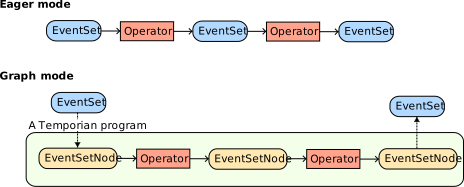
The <outputs> can be specified as an EventSetNode, a list of EventSetNodes, or a dictionary of names to EventSetNodes, and the result of tp.run() will be of the same type. For example, if <outputs> is a list of three EventSetNodes, the result will be a list of the three corresponding EventSets.
The <inputs> can be specified as:
- A dictionary of
EventSetNodestoEventSets, or - A dictionary of names to
EventSets, or, - A list of
EventSets, or - A single
EventSet
This lets Temporian know the EventSetNodes of the graph that each input EventSet corresponds to. If <inputs> is a dictionary of names to EventSets, the names must match the names of EventSetNodes in the graph. If <inputs> is a list or a single EventSet, the names of those EventSets must do the same. If we specify the inputs as a dictionary, we could skip passing a name to a_evset.
input_node = tp.input_node([("f1", tp.float64), ("f2", tp.str_)])
feat_1_node = input_node["f1"]
result_1_node = feat_1_node.simple_moving_average(window_length=2)
result_2_node = feat_1_node.simple_moving_average(window_length=4)
result_3_node = result_1_node - result_2_node

result = tp.run([result_1_node,result_2_node, result_3_node], {input_node: evset})
Remarks:
- It's important to distinguish between a
tp.EventSet, such asevset, that contains data, and atp.EventSetNode, likeinput_node, that connect operators together and compose the computation graph, but do not contain data. - No computation is performed when defining the graph (i.e., when calling the operator functions). All computation is done during
tp.run(). - In
tp.run(), the second argument defines a mapping between inputEventSetNodesandEventSets. If all necessary inputEventSetNodesare not fed, an error will be raised. - In most cases you will only pass
EventSetsthat correspond to the graph's inputEventSetNodes, but Temporian also supports passingEventSetsto intermediateEventSetNodesin the graph.
The @tp.compile annotation takes a function inputing and outputing tp.EventSetNode, and automatically calls tp.run on the result of the function if a tp.EventSet is provided as input.
@tp.compile
def my_function(x : tp.types.EventSetOrNode) -> tp.types.EventSetOrNode:
    return x.simple_moving_average(window_length=0.5)

# Feeding an EventSet
input_evset = tp.event_set(timestamps=[1, 2, 3],features={"value": [5., 6., 7.]})
assert isinstance(my_function(input_evset), tp.EventSet)

# Feeding an EventSetNode
input_node = tp.input_node([("value", tp.float64)])
assert isinstance(my_function(input_node), tp.EventSetNode)
Importantly, variables in a tp.compile function are EventSetNode and not EventSet. Therefore, you cannot directly access the event set data.
In addition, the compiled function execution first generates the graph. The graph is then executed. In the next example, the compiled function generates a graph with 10 operators.
@tp.compile
def my_function(x : tp.EventSetNode) -> tp.EventSetNode:
    for i in range(10):
        x = x.simple_moving_average(window_length=i+1)
    return x
You can create a compiled function with a if. However, the condition of the if cannot depend on the EventSet data.
@tp.compile
def my_function(x : tp.types.EventSetOrNode, a:bool) -> tp.types.EventSetOrNode:
    if a:
        return x.rename("a_branch")
    else:
        return x.rename("non_a_branch")

print(my_function(input_evset, a=True).schema.features)

print(my_function(input_evset, a=False).schema.features)
[('a_branch', float64)]
[('non_a_branch', float64)]
If you want to create a program conditional on EventSet data, you can use EventSet.filter().
@tp.compile
def my_function(x : tp.types.EventSetOrNode) -> tp.types.EventSetOrNode:
    return x["value"].filter(x["condition"])

my_function(tp.event_set(
	timestamps=[1,2,3],
	features={
        "value": [10, 11, 12],
        "condition":[True, True, False]}
))
| timestamp | value |
|---|---|
| 1 | 10 |
| 2 | 11 |
To simplify its usage when the graph contains a single output EventSetNode, node.run(...) is equivalent to tp.run(node, ...).
Warning: It is more efficient to run multiple output EventSetNodes together with tp.run() than to run them separately with node_1.run(...), node_2.run(...), etc.
Previously, we defined the input of the graph with tp.input_node(). This way of listing features manually and their respective data type is cumbersome.
If an EventSet is available (i.e., data is available) this step can be changed to use evset.node() instead, which will return an EventSetNode that is compatible with it. This is especially useful when creating EventSets from existing data, such as pandas DataFrames or CSV files.
# Define an EventSet.
a_evset = tp.event_set(
	timestamps=[0, 1, 2],
	features={
        "feature_1": [1.0, 2.0, 3.0],
        "feature_2": ["hello", "little", "dog"],
        "feature_3": ["A", "A", "B"],
	}
)

# The following three statements are (almost) equivalent.
a_node = tp.input_node(
    features=[
        ("feature_1", tp.float64),
        ("feature_2", tp.str_),
    ],
    indexes=[("feature_3", tp.str_)])

a_node = tp.input_node(
    features=a_evset.schema.features,
    indexes=a_evset.schema.indexes
)

a_node = a_evset.node()
Serialization and deserialization of a graph
Temporian graphs can be exported and imported to a safe-to-share file with tp.save_graph() and tp.load_graph(). In both functions input and output EventSetNodes need to be named, or be assigned a name by passing them as a dictionary.
# Define a graph.
evset = tp.event_set(
	timestamps=[1, 2, 3],
	features={"f1": [0.1, 0.2, 0.3]},
)
a = evset.node()
b = a.moving_count(1)

# Save the graph.
tp.save_graph(inputs={"input_a": a}, outputs={"output_b": b}, path="/tmp/my_graph.tem")

# Equivalent.
a.name = "input_a"
b.name = "output_b"
tp.save_graph(inputs=a, outputs=[b], path="/tmp/my_graph.tem")

# Load the graph.
loaded_inputs, loaded_outputs = tp.load_graph(path="/tmp/my_graph.tem")

# Run data on the restored graph.
tp.run(loaded_outputs["output_b"], {loaded_inputs["input_a"]: evset})
| timestamp | count |
|---|---|
| 1 | 1 |
| 2 | 1 |
| 3 | 1 |